Overview
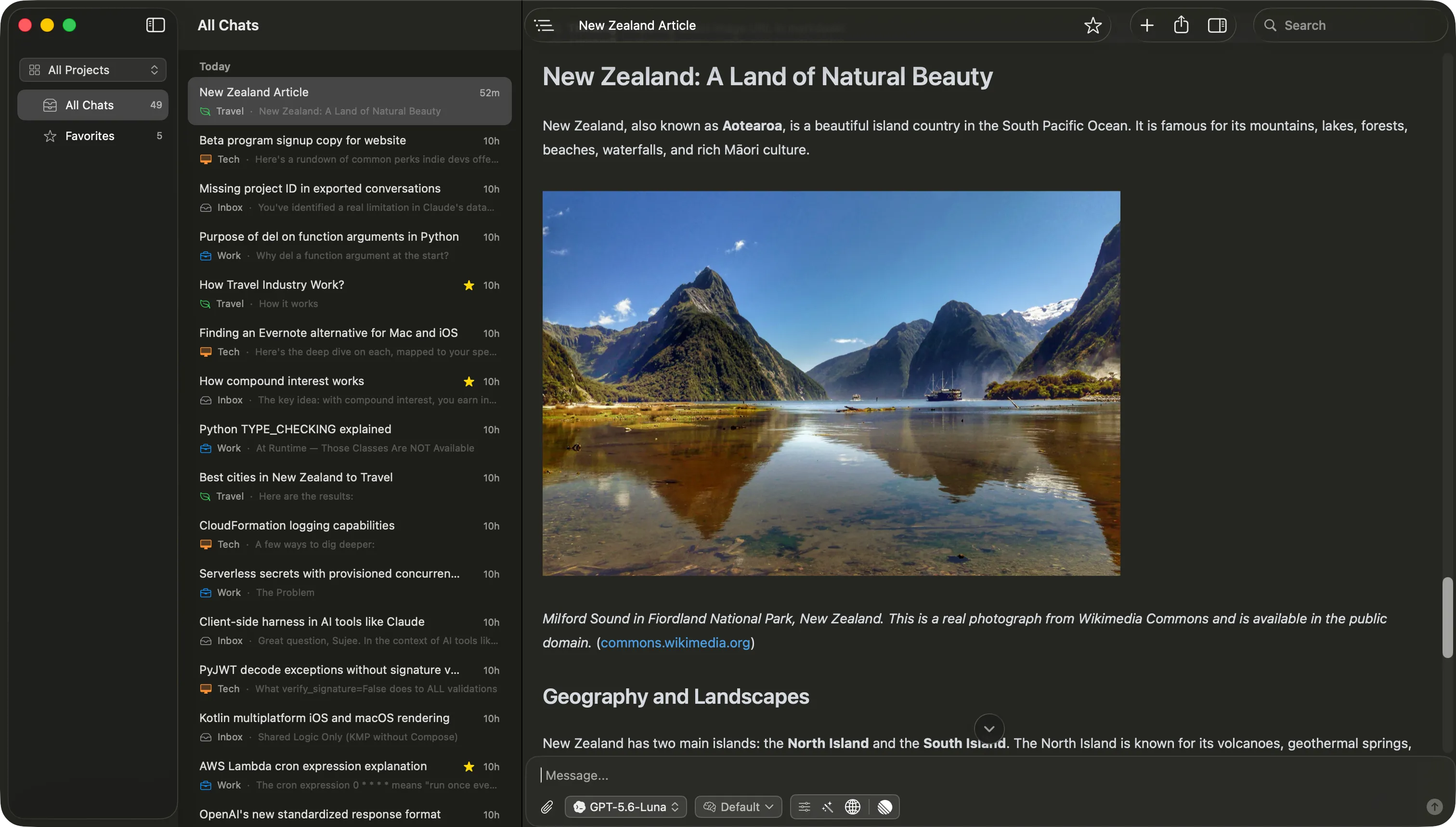
Vinaa is a native macOS app that keeps every AI conversation in one organized workspace instead of scattered across browser tabs and provider apps. Connect OpenAI, Anthropic, and Google with your own API keys, or run local models through Ollama and LM Studio, and switch models mid-conversation without starting over. Chats live in projects and nested folders, open as tabs or separate windows, and stay searchable months later. Attach files and reuse them across conversations, connect tools via MCP or provider web search, and save repeat prompts as templates with fill-in placeholders. Built with SwiftUI and AppKit rather than Electron, so it launches fast, streams smoothly, and behaves like a Mac app. Conversations are stored locally, optional sync runs through your own private iCloud account, API keys are held in the macOS Keychain, and requests go straight to the provider you pick. Nothing is used to train models. Import your history from ChatGPT and Claude, and export to Markdown or PDF whenever you want. One-time purchase, no subscription.
Pricing: $20 lifetime (first 100 customers) | $30 for the rest of the beta | $80 after beta | Free beta download
Minimum macOS: 15.0 (Sequoia)
Architecture: Apple Silicon, Intel
Key Features
- One workspace for every model: OpenAI, Anthropic, and Google with your own API keys, plus local models via Ollama and LM Studio
- Switch models mid-conversation without losing context or starting over
- Model picker with favorites, search, and filters by provider, capability, context window, and price
- Projects and nested folders keep related chats together, with a default model and default tools per project
- Automatic filing: let Vinaa sort new chats into the right folder for you
- Multiple windows and tabs, so several projects and conversations stay open at once
- Conversation outline with jump-to-message and Markdown heading navigation for long chats
- Attach files by picking, dragging, or pasting, and reuse files from earlier conversations
- Connect services through MCP, or use provider tools like web search, with a Tool Finder that loads the right tools on demand
- Prompt library with slash-menu insertion and templates with fill-in placeholders
- Import your existing history from ChatGPT and Claude; export any chat to Markdown or PDF
- Chats stored locally on your Mac, with optional sync through your own private iCloud account
- API keys protected by the macOS Keychain; requests go directly to the provider you choose
- Your prompts, files, and responses are never used to train AI models
- Built with SwiftUI and AppKit (not Electron) for fast launch, smooth streaming, and low memory use
- Bulk organize: multi-select chats to move, file, or favorite them
- Reasoning controls to choose how long a model should think
- One-time purchase with lifetime updates, no subscription, 30-day refund