Proof Take
Check voiceovers against your script, locally on Mac.
Overview
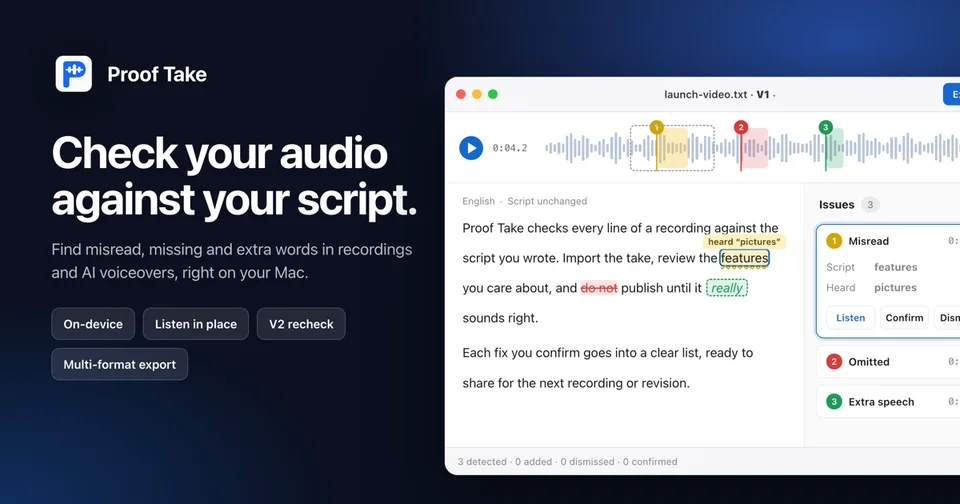
Proof Take is a native Mac app for checking voiceovers against a script locally. Its on-device speech recognition helps flag suspected misreads, omissions, and extra words in English or Chinese. Listen to each passage in context, confirm or dismiss suggestions, then copy a fix list or export markers for Adobe Audition, REAPER, or Pro Tools. Import a revised full-length recording to review tracked issues again and look for new differences. Import scripts from TXT, DOCX, PDF, or HTML and audio from WAV, MP3, or M4A. For a book-length manuscript and a recording of one chapter, automatic chapter matching focuses review on the relevant section. Playback supports 0.75× to 2× speed while preserving pitch. Proof Take measures leading and trailing silence and shows how it compares with ACX’s 1–5 second recommendations; it does not certify overall ACX compliance or guarantee detection of every error. Recordings from 1–3 hours have been tested. Proof Take 1.6.0 (119), released November 12, 2026, requires Apple silicon and macOS 14 or later. The 14-day trial starts with your first Check. After the trial, US$29 is a one-time purchase for up to two Macs. The license never expires, includes all future updates, and has no paid major-version upgrade. A 14-day money-back guarantee applies.
Pricing: US$29 one-time after 14-day trial; lifetime updates, up to 2 Macs
Minimum macOS: 14.0 (Sonoma)
Architecture: Apple Silicon
Key Features
- On-device local recognition for English and Chinese
- Scripts: TXT, DOCX, PDF, HTML; audio: WAV, MP3, M4A
- Automatic chapter matching for book manuscripts
- Review suspected misreads, omissions, and extra words in context
- Copy fix lists or export markers for Audition, REAPER, and Pro Tools
- Recheck revised full-length recordings and tracked issues
- Pitch-preserving playback from 0.75× to 2×
- Measured leading and trailing silence vs. ACX 1–5 second recommendations
- Tested with 1–3 hour recordings